White Balance
Quickly get the perfect white balance by triggering the camera’s automatic white balance feature.
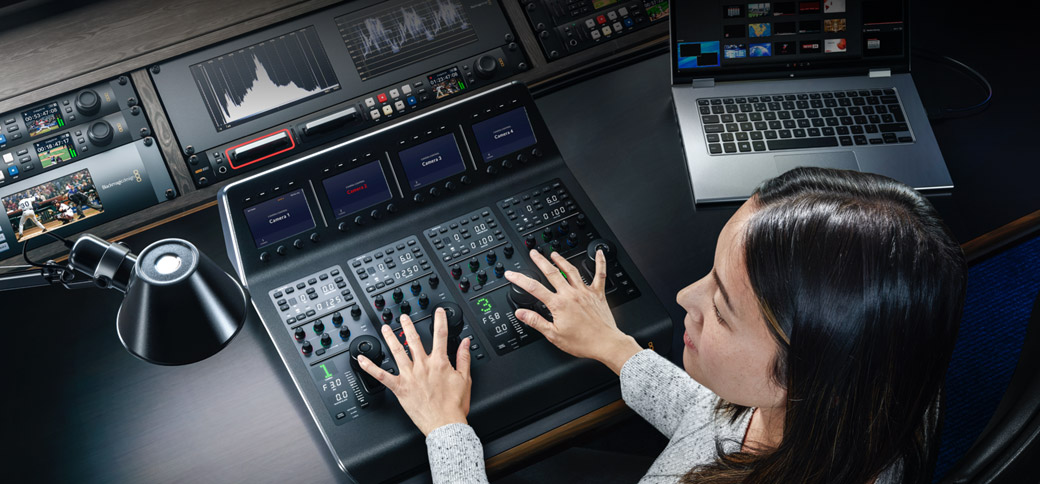
ATEM Camera Control Panels are professionally built broadcast camera control units that enhance ATEM Software Control with high-quality physical buttons and controls for faster use. ATEM Constellation supports camera control when used with the Blackmagic Studio Cameras, Blackmagic URSA Broadcast and the amazing Blackmagic URSA Cine digital film camera for remote camera control. The control panel lets a single person monitor and adjust a wide range of camera parameters such as black levels, gain, color balance, shutter speed and more. This leaves your camera operators free to focus on more important tasks such as framing and shot composition. Plus it works with any ATEM switcher model!
Find Reseller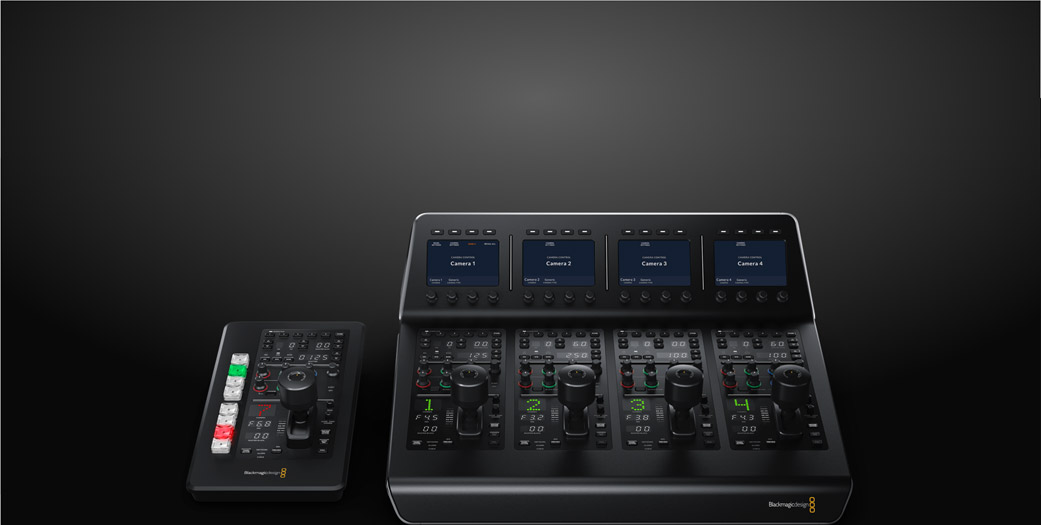
Portable camera panel with high end broadcast CCU controls, including battery, Bluetooth, and 8 camera select buttons for iris, pedestal, shutter, white balance, master gain, RGB balance and more.
Control up to 4 cameras at the same time using the same controls used on high end broadcast camera controllers. Controls iris, shutter speed, white balance, master gain, pedestal, RGB and more!

ATEM Constellation works with the latest Blackmagic SDI and IP cameras that have studio camera features that you can remotely control! This means you get remote camera control, tally indicators and a DaVinci color corrector built in. All control is via the switcher aux output connection to the camera PGM input, allowing you to broadcast control commands from the switcher to the camera with a single SDI cable! That means you can remotely control settings in the camera plus focus, iris and zoom on supported lenses. Pocket Cinema Cameras include a DaVinci primary color corrector so you get more than simple CCU controls as you can also do a full color grade in the camera for a cinematic look!

When working on live production, it’s important all of the cameras are matched with proper color balance so that you get a consistent look as you cut and transition between the different cameras. The ATEM Camera Control Panel features 4 individual camera controllers while ATEM Micro Camera Panel allows you to choose between up to 8 cameras in one panel. When used with a larger number of cameras, it's very quick to change which camera you control on each CCU channel. On ATEM Camera Control Panel, each camera controller includes an LCD screen with soft buttons and knobs. Both panels feature a full set of traditional CCU controls, so you always get a clear indication of the camera state.

The top section on each camera control has settings for changing camera settings, plus it lets you save and recall scene presets. Getting remote access to important camera settings is vital when you are working in conditions where the light can change during your job such as daylight, and with these settings you can quickly adjust cameras based on changes in the scene. Controls in this section include master gain, ND filters, white balance, shutter speed and more!

Quickly get the perfect white balance by triggering the camera’s automatic white balance feature.

Save and recall scene presets, perfect when you do regular work with the same conditions each day.

Boost sensitivity of the sensor as conditions become darker or when more depth of field is needed.

Change the density of the electronic ND filter on compatible cameras.

Set the shutter speed of the camera and a slower shutter speed can also boost brightness in dark conditions.

Select to output color bars for the selected camera. Color bars are very useful when setting up for a new job!

The center section features independent RGB controls for adjusting the camera color for the white and black parts of the image. Because the Blackmagic cameras with studio features have a full DaVinci Resolve primary color corrector built in, you have amazing control over the color in the camera. These red, green and blue controls for adjusting blacks and whites mean you can accurately match multiple cameras, which is vital for cutting seamlessly without color shifts. One trick experienced camera control operators use is to only adjust the red and blue channels, so you can add and remove red and blue tint without getting too far away from accurate color!

Independent RGB controls for adjusting the white part of the image.

Independent RGB controls for adjusting the black part of the image.

The lower section of the panel is where the most used controls are located and features a large easy to read camera number that highlights red when the camera is on air! The main control for operating the cameras is the high quality professional joystick that’s used to precisely adjust the iris when moved up and down, and the master black when the knob is rotated. This is the exact same type of control that's used on camera control units used in broadcast, so you get a true professional user interface. There’s also a call button for communicating with the camera operator, along with a panel lock button and indicators for the network, power and cable connection to the camera.

Joystick for adjusting iris and master black. Move up and down for iris, rotate for master black and push for monitoring.

To stop the iris from becoming too sensitive with different lens types, you can reduce the adjustment range.

To ensure you don't accidentally bump the camera adjustment, you can lock the iris and master black control.

This indicator provides feedback on the amount of master black adjustment applied to the remote camera.

If you have set up a perfect color match between all of your cameras, then you can lock all panel adjustments.

On ATEM Constellation, these lights indicate status of network and SMPTE fiber camera connections.

Used for switching the camera feed to an aux video output, so you don’t have to push the joystick.

Big camera number display shows you what camera is assigned to each channel and turns red when on air!

Flashes tally light on the camera to get the attention of the camera operator that you need to talk to them.

Adding an ATEM Camera Control Panel to your ATEM Constellation is easy as all the network settings have been assigned for you, so you can simply connect direct from the ATEM Camera Control Panel to the switcher’s control port. The ATEM panels feature loop through Ethernet connections so you just loop through the panels. Because Ethernet is a network, you can interconnect multiple ATEM Camera Control Panels with the ATEM Advanced Panels to complete a customized and professional broadcast production studio. On ATEM Micro Camera Panel, you connect via USB-C or Bluetooth. Plus, if you're doing location work, you can move the panels between any ATEM switcher model for different types of jobs.

Even though ATEM Constellation features a compact rack mount design, that doesn't mean it’s small on features! ATEM 4 M/E Constellation IP is a powerful switcher that offers the same professional workflow used by broadcasters worldwide when paired with ATEM hardware panels. For high end work, you need a professional system for education or just want the speed of a hardware panel then an ATEM Camera Control Panel is worth adding to your workflow. The ATEM Camera Control is incredibly fast to use as it features traditional CCU controls so you get the benefit of years of broadcast experience. Now even startup companies and education institutions can use a true professional broadcast switcher.


